
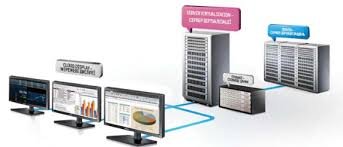
Description
Virtual Desktop Infrastructure (VDI)
-
Centralized Desktop Management – Simplifies administration by managing all virtual desktops from a central console.
-
Remote Access & Mobility – Enables employees to securely access desktops from anywhere on any device.
-
Enhanced Security – Keeps data within the data center, reducing risks of data loss or unauthorized access.
-
Resource Optimization – Efficiently allocates computing resources across multiple users to reduce hardware costs.
-
Scalability & Flexibility – Easily adds or removes virtual desktops to accommodate business growth or seasonal demand.
-
Persistent & Non-Persistent Desktops – Supports both permanent user environments and temporary session-based setups.
-
Data Protection & Backup – Centralized storage ensures consistent backups and simplifies disaster recovery.
-
Application Virtualization – Delivers specific applications without needing a full desktop deployment.
-
Multi-Factor Authentication (MFA) – Adds an extra security layer for user access to virtual desktops.
-
Integration with Active Directory – Provides unified user authentication and policy enforcement.
-
Performance Monitoring & Analytics – Tracks usage, latency, and system health for proactive management.
-
BYOD (Bring Your Own Device) Support – Allows employees to use personal devices securely without compromising corporate data.
-
Cost Efficiency – Reduces endpoint hardware and maintenance expenses by extending device lifecycles.
-
Cloud & On-Premises Deployment – Offers deployment flexibility across private, public, or hybrid cloud environments.
-
Disaster Recovery & Business Continuity – Ensures user access and data availability even during outages or failures.
Reviews
There are no reviews yet.